The Valheim server had been running for months before I touched it. It had a world, a handful of players, a backup script, and a join code that someone had to look up by hand every time a new person wanted in. Every web panel I looked at solved that problem by taking the server over. Install this, and it owns your world, your compose file, your mods, your updates. That is a reasonable design. It was not the design I wanted. I did not want a new server. I wanted a window into the one I already had. So the constraint came first, before any code: attach, do not own. Dashboard — join code, server state, world day, players, and the backup list on one screen. Three channels that were already there The server was already exposing everything a panel needs. It just was not labelled that way. Supervisor XML-RPC on :8088 — start, stop, process state, log reads. Already authenticated, already running. RCON on :25575 — admin commands and player lists, out of band over TCP, works with crossplay…
Gacha sellers run their business on a spreadsheet. One column for the item, one column for the odds, and a hope that nobody asks how the numbers were chosen. That is why Gachasik exists. Not to make gacha — people already do that — but so that the random selection can be shown. One thing has to be right The rest is features. This is the product: Random selection runs on the server, from a cryptographic source — not on the buyer's phone. Odds are displayed on the page, before the pull. Every pull produces exactly one item and a public receipt. The picker's code is open source, linked from the site. That last point took the longest to decide. Writing "fair" in the footer is easy. Publishing the function that actually performs the selection, so a stranger can read it and check — that is harder. I chose the harder one, because a fairness claim you cannot verify is just marketing. Rules the product may not break Two constraints shaped almost every screen. The platform serves…
This site runs on Chyrp Lite — a small, self-hosted blogging engine that does roughly what I need and nothing else. It's been up for a while on the default theme, which is perfectly good and completely anonymous. I finally rewrote it. What was wrong Not much, honestly. The theme worked. But three things bothered me. First, the navigation listed ten pages in one flat list, and seven of them existed only to embed a service in an iframe. Several of those embeds pointed at endpoints that no longer answer, or that refuse to be framed at all. The sidebar was offering links to broken panels. Second, the layout was a single narrow column with a sidebar and no sense of what the site was for. A visitor landed on it and learned my name. That was about it. Third, the content was a list of facts with no way in. What I changed A real homepage. Instead of dropping visitors straight into the blog index, there's now a front page: who I am, where I am, what I do, and four ways to go deeper. It answers…
At 00:32 a log line started repeating. By 16:45 it had appeared 785 times. [memory] sync failed … Plugin "memory-core" runtime is no longer active The memory plugin on my assistant gateway had stopped working. Not crashed — something worse. It was still installed, still reporting as loaded, and completely unable to do anything. The wrong fix I reloaded the plugin. The errors stopped. For fourteen minutes. Then traffic picked up, and they came back exactly as before. That fourteen-minute silence was the most misleading thing in the whole incident. It looked like a fix. It wasn't. It was an idle window with nothing left to fail. The actual cause I stopped guessing and read the runtime source. When a plugin is hot-reloaded, the gateway builds a new registry generation. Anything still holding a reference to the old generation is now holding a dead handle. The memory-sync bridge — the part that embeds and indexes content — had captured its reference at startup and never re…
At 18:57, three of my machines went down within about four minutes of each other. I didn't know that yet. What I knew was that the gateway had come back and was reporting healthy, and that a couple of sessions looked like they'd been cut off mid-sentence. The obvious first guess — and the wrong one — was a software fault. Then I found out what had actually happened: a brief power cut. The main breaker had tripped. Overload. The timeline msi-server 18:57 .185 19:01 pi-server 19:01:33 arm-server unaffected — uptime 3 weeks That last line is the interesting one. arm-server is on a different circuit. The outage took out one ring main, not the house. Which means the machines that died and the machine that didn't are telling me something about the wiring — not about the machines. What recovery actually looked like Every affected host came back on its own. That's the whole point of setting them up that way, but it's worth confirming rather than assuming: Gateway process back up, zero…
I have two machines that matter. msi-server is the newer one — a small MSI Cubi 5 running Ubuntu Server, and the box my assistant gateway lives on. .185 is the older desktop, still doing useful work, still holding a few things I haven't got round to migrating. For a long time the only channel between them was me. I'd notice something on one machine, walk over to the other, and retype it. That works fine right up until it doesn't. So I built a relay. Not a clever one — two one-way pipes. Pipe one: .185 → me A small script on .185 posts a message to an HTTPS endpoint on the gateway. It's token-authenticated, restricted to a single agent, and delivered to my phone labelled 📡 .185 so I always know which machine is speaking. The important part is what it doesn't do. Nothing on .185 listens for inbound connections for this. The machine only ever makes outbound requests. No new port, no new attack surface. Pipe two: me → .185 This is the interesting half, because the obvious design is wrong…
The Valheim server had been running for months before I touched it. It had a world, a handful of players, a backup script, and a join code that someone had to look up by hand every time a new person wanted in.
Every web panel I looked at solved that problem by taking the server over. Install this, and it owns your world, your compose file, your mods, your updates. That is a reasonable design. It was not the design I wanted. I did not want a new server. I wanted a window into the one I already had.
So the constraint came first, before any code: attach, do not own.
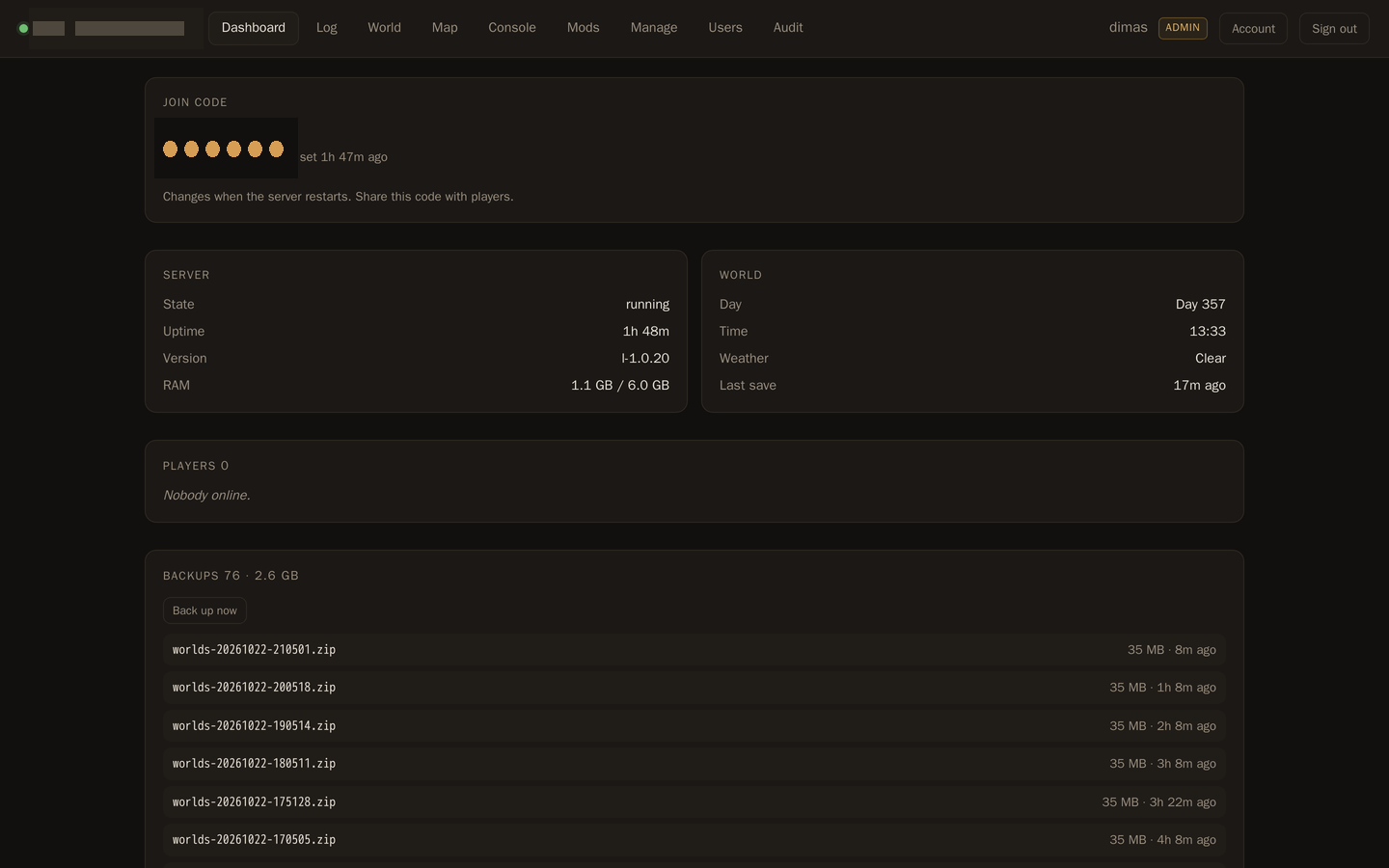
Dashboard — join code, server state, world day, players, and the backup list on one screen.
Three channels that were already there
The server was already exposing everything a panel needs. It just was not labelled that way.
Supervisor XML-RPC on :8088 — start, stop, process state, log reads. Already authenticated, already running.
RCON on :25575 — admin commands and player lists, out of band over TCP, works with crossplay.
The ValheimUI agent on :2456 — structured JSON: players with positions, world state, deaths, map layers.
No Docker socket. No privileged container. No shell string interpolation. The panel runs as an unprivileged user, drops every capability, and can only do what those three channels allow — which is exactly the point. A control panel that can run arbitrary commands as root is not a control panel, it is a remote shell with nicer fonts.
Two verbs that lied
Supervisor has no restartProcess. There is a restart button in its HTML form and a restart verb in supervisorctl, so it is reasonable to assume the XML-RPC API has one too. It does not. supervisor.restart restarts supervisord itself, and calling restartProcess returns UNKNOWN_METHOD.
The fix is boring: stop, wait for STOPPED, start. It is also better, because the wait is what gives the game time to run its SIGTERM handler and save the world. A restart that returns before the save finishes is a restart that loses progress.
The same trap appeared a second time. The agent's /v1/commands/time looks like a getter. It is a setter — call it with no arguments and it answers "fraction, skip=morning or seconds is required". The read lives in RCON. The catalog entry moved.
Both bugs share a shape: the name of the verb suggested behaviour I had not verified. Wiring a button to an endpoint is not the same as knowing what the endpoint does.
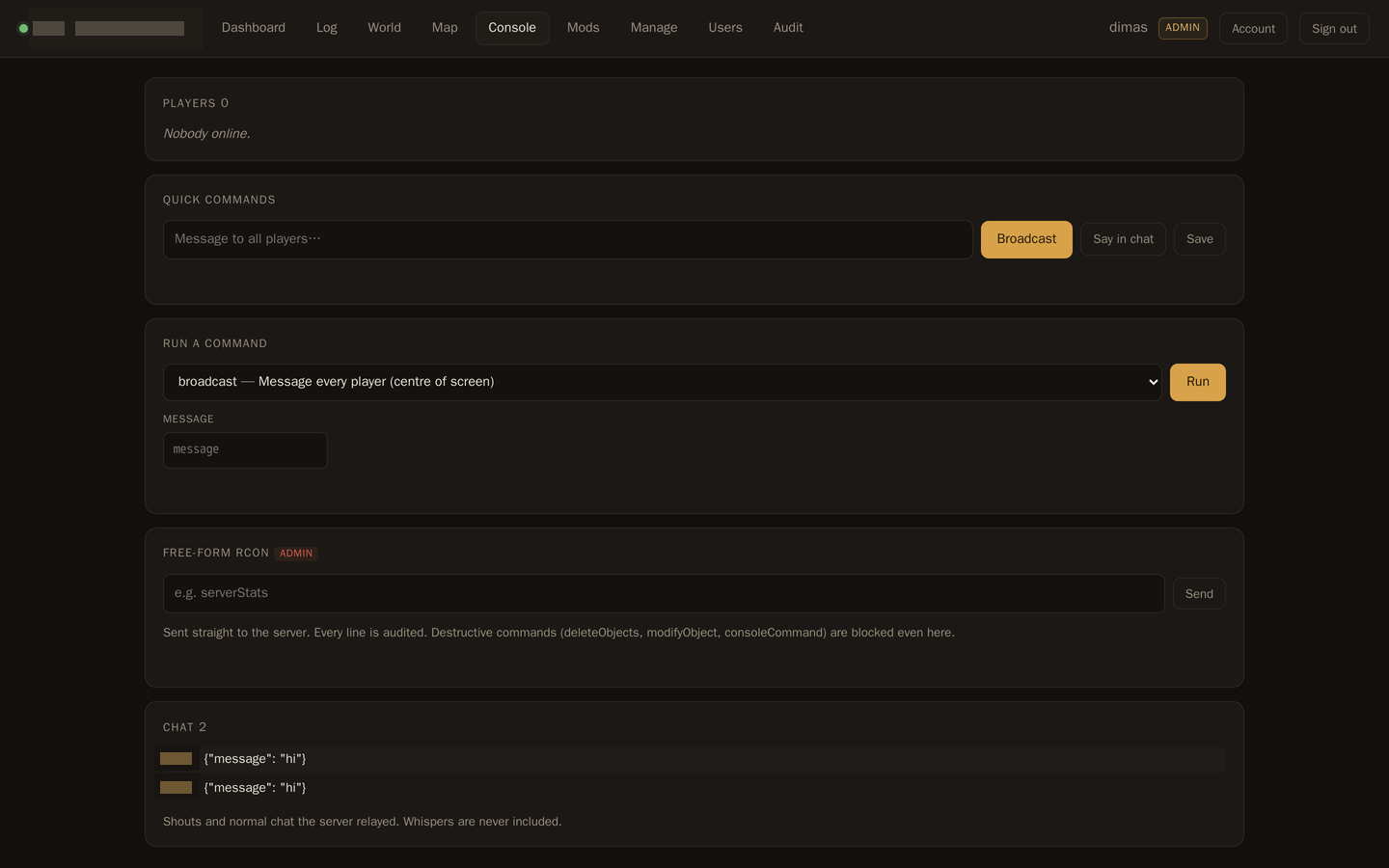
Command console — a 25-command catalog where each entry declares its own transport, a free-form RCON box for admins, and live chat.
The mod that installed perfectly and never loaded
This one is my favourite, because the panel was not wrong about anything it reported.
The panel writes plugins to /config/bepinex/plugins. The game loads them from /opt/valheim/bepinex/BepInEx/plugins. Those are different directories, and the copy between them happens inside valheim-bootstrap — a one-shot supervisor program that runs at container start and then sits in EXITED for the rest of its life.
So a plain stop/start restarted the server with the old plugin set. The panel said "installed". The install had worked. The game log said three plugins loaded, not five.
For a mod manager, silently ignoring a new mod is the worst possible failure. Worse than an error, because an error gets fixed. The fix was to run the bootstrap program between stop and start, on every restart, and to make start sync as well. Bootstrap is idempotent, so running it when nothing changed costs a second. Then the log said five loaded, zero failed.
There is a smaller lesson inside that one: the panel's success message described the panel's work, not the server's state. Those are different claims, and only one of them is worth showing to a user.
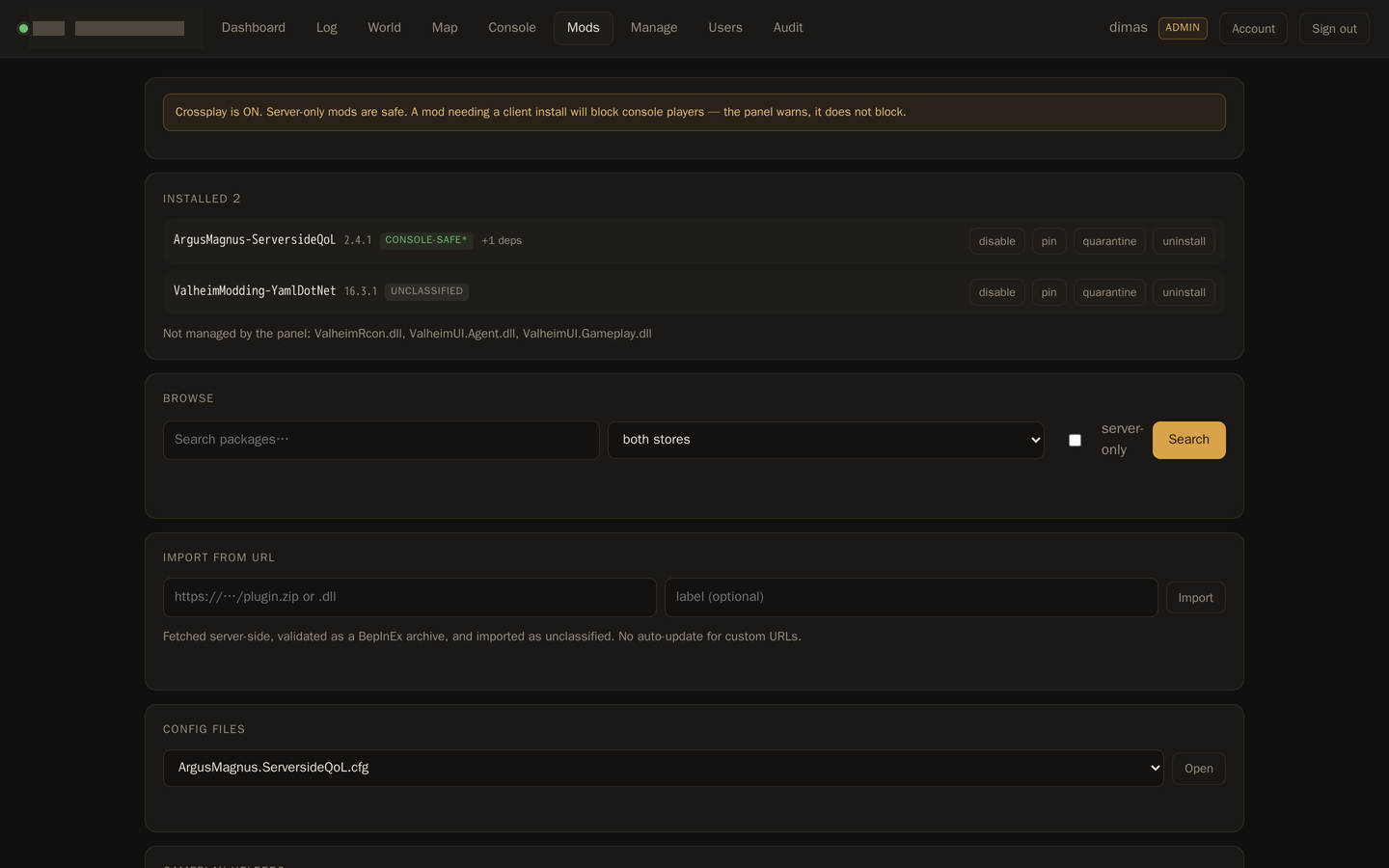
Mod manager — Thunderstore and Hexium merged into one view, with a crossplay warning, per-package quarantine, and the three hand-installed plugins listed honestly as unmanaged.
The map was not a picture
I assumed /v1/map/layers returned an image. It returns a 2048×2048 RGBA PNG of raw fields: red carries the terrain mask and biome code, green and blue carry height, alpha carries forest density. POST /v1/map/render does not render — it starts sampling. The actual styling lives in the agent's Go code, which I was not going to port.
So the panel styles the map itself, in the browser, on a canvas. That turned out to be the better architecture anyway: 4.2 million pixels styled in Python takes seconds per frame, and a canvas does it in milliseconds and then pans without asking the server at all. The server's job shrank to caching, auth, and aggregating objects.
I verified it by rendering a 512-pixel preview and looking at it. Deep North white at the top, Ashlands red-brown at the bottom, ocean blue, meadows green, mountains grey with snow. North-up confirmed, biomes in the right places, coastlines clean. Code review would not have caught a flipped axis; a picture does.
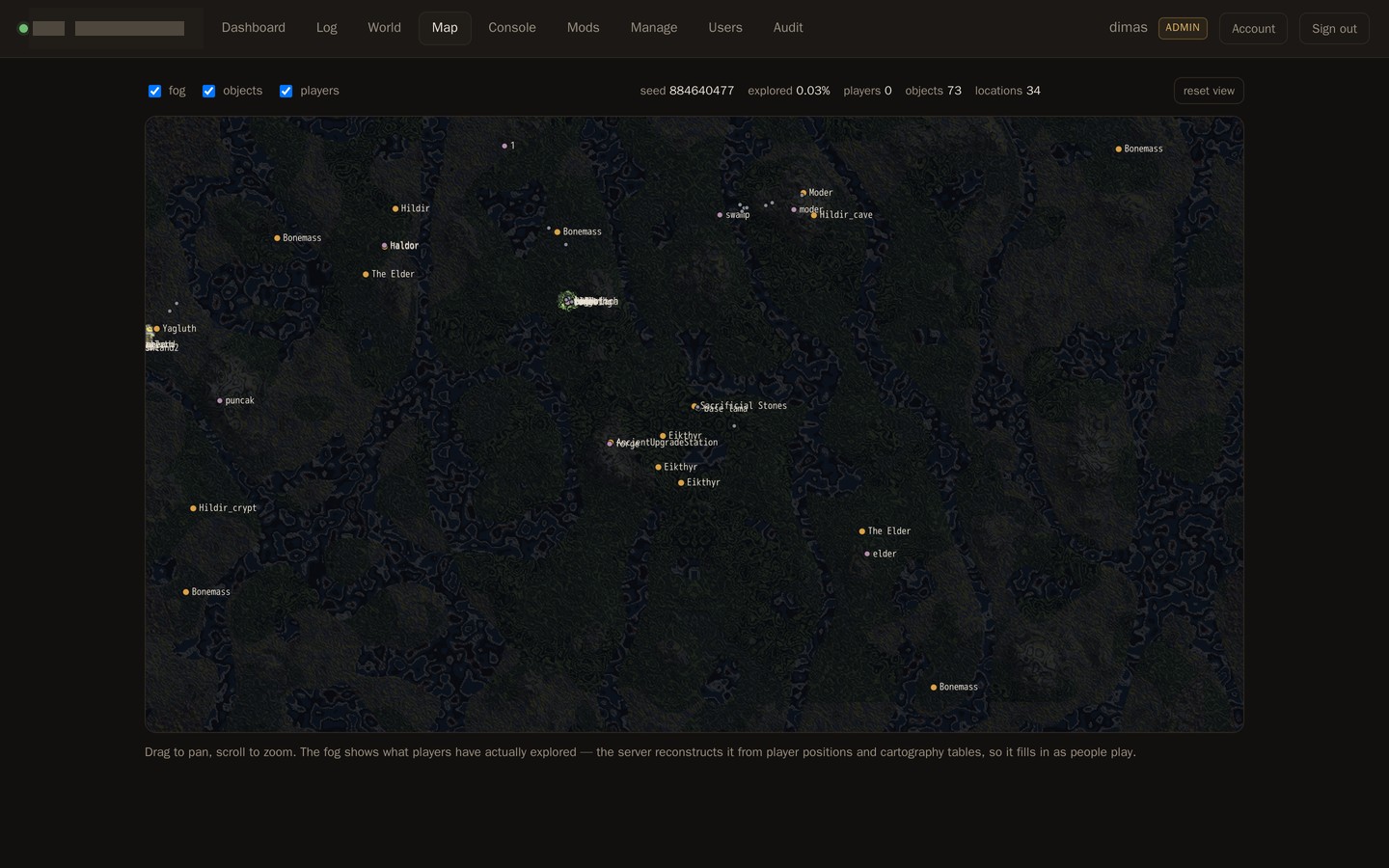
The map, styled in the browser: biomes, boss altars, portals, and the fog mask that fills in as people play.
Fog of war is currently 100% unexplored — the agent only started recording player positions today. Honouring that mask would have shown a black square. So fog turns itself off while the data is empty, says why in the UI, and will turn itself back on when there is something to hide.
The security mistake I made
The Discord bridge lets a bot query and control the server. My first version had the bot pass the caller's role IDs to the relay script, which then decided what to allow.
That is a trust boundary in the wrong place. The bot runs a small free model. A prompt injection could have made it claim the Admin role, and the script would have believed it.
Now the relay asks Discord directly: given this guild and this user ID, what roles does the member actually have? The claim is verified against the guild, not accepted.
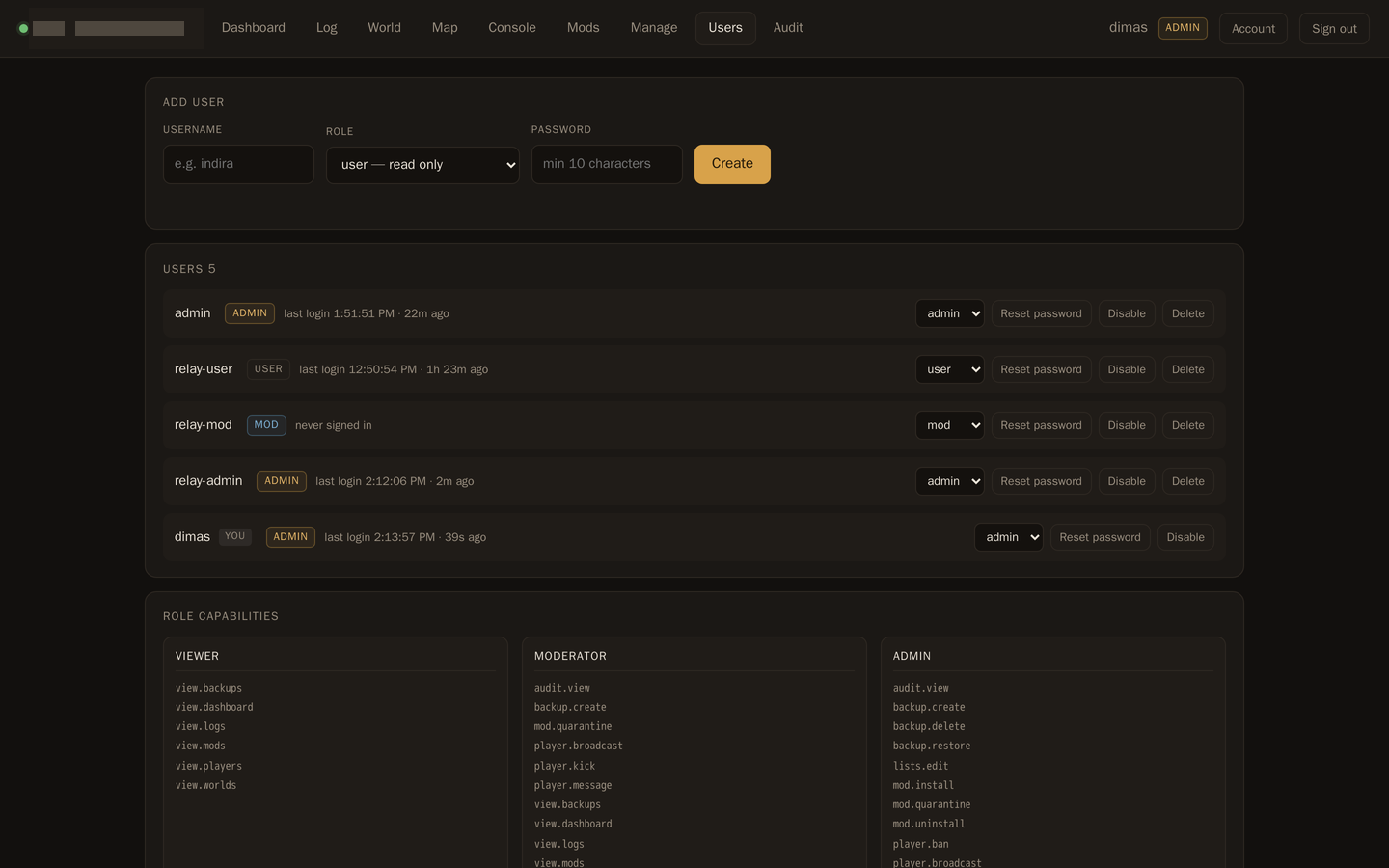
And because one relay account would have made the script's check the only boundary, there are three — relay-user, relay-mod, relay-admin — and the script logs in as the granted role. The panel enforces the same limit independently. I tested it by pretending the script had a bug: a relay-user session gets 403 on restart, on list edits, on mod installs, and 200 on reads.
Users and roles — three roles, thirty capabilities, and the grid the server enforces rather than the UI.
Two locks, one of which does not trust the other. That is the shape I want around anything that can restart a server.
A CSS rule worth keeping
Pan and zoom did not work. The map drew, the controls responded, nothing moved.
The message overlay carried the hidden attribute. Its class also set display: grid. Author CSS beats the browser's default [hidden] { display: none }, so the overlay stayed laid out — absolutely positioned, inset zero, semi-opaque — and swallowed every mouse event before it reached the canvas.
Pan and zoom were never broken. They were unreachable.
The fix is one line: [hidden] { display: none !important }. The pattern recurs across the whole panel, so it is now global rather than local. Two smaller map bugs came out of the same pass: the fog layer was being rebuilt pixel by pixel on every mousemove, and the canvas sized itself from a hidden tab and came out 1×1.
What is still honest-gaps
The death leaderboard is empty. Nobody has died since the tracker started, and history before today is not recoverable.
Fog stays off until exploration data exists.
Three plugins were installed by hand before the panel existed, so the panel lists them as unmanaged rather than claiming them.
World switching is not offered. The active world comes from an environment variable, so switching needs a privileged compose edit. The UI says so instead of pretending.
The panel is about 9,000 lines — 5,600 of Python, 2,000 of JavaScript, the rest markup and CSS. It has no Docker socket and runs beside a server it did not build. It is published under MIT.
The reason it exists is the constraint I started with. Owning the server would have been easier to write and harder to trust.
Gacha sellers run their business on a spreadsheet. One column for the item, one column for the odds, and a hope that nobody asks how the numbers were chosen.
That is why Gachasik exists. Not to make gacha — people already do that — but so that the random selection can be shown.
One thing has to be right
The rest is features. This is the product:
Random selection runs on the server, from a cryptographic source — not on the buyer's phone.
Odds are displayed on the page, before the pull.
Every pull produces exactly one item and a public receipt.
The picker's code is open source, linked from the site.
That last point took the longest to decide. Writing "fair" in the footer is easy. Publishing the function that actually performs the selection, so a stranger can read it and check — that is harder. I chose the harder one, because a fairness claim you cannot verify is just marketing.
Rules the product may not break
Two constraints shaped almost every screen.
The platform serves sellers, not buyers. Buyer and seller settle payment outside the platform. The platform owns the random selection; it never sits in the middle of a payment. The product is smaller and safer, and that is the honest version.
This is not a payment tool. Credits are called credits. There is no cash-out and no transfer. The interface has a hard word list, and an automated test scans every screen so the framing never slips into betting language. Even the disclaimer text is not allowed to use that word. If you have to explain why something is not a bet, you have already lost the framing.
One day, then one week
The first commit landed at 04:47 on 30 September — scaffold and a frozen build plan. By 12:58 the same day, everything stood: pools and odds, the selection engine, the QRIS credit ledger, referrals, the public storefront, the margin calculator, and the deploy bundle. Thirty-six commits in a day.
Then it kept going. Reveal animation. Nested pools — one item can continue into another pool owned by the seller, up to three stages for one fee. A no-login demo on the landing page that runs the real selection code with sample items, so you can pull before you trust. A kiosk mode for booth screens.
The final count: 114 commits, 75 test files, 12,367 lines of tests against 10,989 lines of application Python. Schema from v1 to v16 — every migration additive except one, which needed a real table rebuild to remove a template the CHECK constraint no longer allows.
What broke
Two things almost shipped broken, and both are worth naming.
The deploy image lost two files.draw.js and share.js never made it into the built wheel — the animation would simply have died in production, with no error and no log line. There is now a test that guards the whole app/static directory, so the image cannot silently drop assets again.
"Force SSL" in Nginx Proxy Manager nearly took the site down. The tunnel hands plain HTTP to NPM, so Force SSL redirects that HTTP to the same HTTPS URL — a loop. The fix: use Cloudflare's "Always Use HTTPS" and leave Force SSL off. A setting that looks correct and is exactly wrong.
There was also a stretch where three subagents failed in a row on the nested-pool feature — one crash-looping, one only doing recon. The main session eventually built it directly. Delegation is not automatically faster than doing the work yourself.
What is still open
I would rather write these down than pretend they are not there:
The legal pages contain real copy but are not final — the pages themselves say they are still waiting on counsel review.
The local repo is one commit ahead of origin.
There is no pricing for B2B or events yet — only a contact page.
Why this is a picker, not a game
The name on the box: "a recorded, configurable random picker — not betting." That is not a euphemism. That is the specification.
The picker is a tool. It does what it is told, shows its work, and keeps a record. Everything in this build follows from that: selection on the server, odds displayed, receipts, a published algorithm.
If the random selection is fair and you can check it, you do not have to trust the seller. That is the whole product.
This site runs on Chyrp Lite — a small, self-hosted blogging engine that does roughly what I need and nothing else. It's been up for a while on the default theme, which is perfectly good and completely anonymous. I finally rewrote it.
What was wrong
Not much, honestly. The theme worked. But three things bothered me.
First, the navigation listed ten pages in one flat list, and seven of them existed only to embed a service in an iframe. Several of those embeds pointed at endpoints that no longer answer, or that refuse to be framed at all. The sidebar was offering links to broken panels.
Second, the layout was a single narrow column with a sidebar and no sense of what the site was for. A visitor landed on it and learned my name. That was about it.
Third, the content was a list of facts with no way in.
What I changed
A real homepage. Instead of dropping visitors straight into the blog index, there's now a front page: who I am, where I am, what I do, and four ways to go deeper. It answers the question the old site left hanging.
Navigation that reflects the actual structure. The per-service pages are gone from the menu. They still exist — every old link still resolves — but the Home Lab page now links out to each service directly, with a one-line description of what it is. Seven iframe panels became one readable index.
A theme with an opinion. IBM Plex Sans and Plex Mono, self-hosted rather than pulled from a CDN. Monospace is reserved for labels, metadata, and anything that reads as data. The palette is warm off-white with a single copper accent, used for links and almost nothing else.
The service list is styled as a rack: index number, name, what it does, and whether it's open to the world or only reachable on the LAN. That last column is the honest one — it tells you before you click whether a link is about to ask for a password.
Accessibility wasn't an afterthought
A skip link for keyboard users, since the sidebar comes first in the markup
Visible focus outlines on every interactive element, in the accent colour
prefers-reduced-motion respected — no transitions, no smooth scrolling, for anyone who's asked for neither
prefers-contrast: more pushes borders and text to full black
A print stylesheet, because these pages are worth keeping on paper
What I'd do differently
Write the content before the theme.
I spent a while designing components — a hero, a status strip, a rack table — and then had to go back and rewrite the page copy to fit them. The design turned out fine. The order was backwards.
Next time: decide what the page needs to say, then decide what it needs to look like.
At 00:32 a log line started repeating. By 16:45 it had appeared 785 times.
[memory] sync failed … Plugin "memory-core" runtime is no longer active
The memory plugin on my assistant gateway had stopped working. Not crashed — something worse. It was still installed, still reporting as loaded, and completely unable to do anything.
The wrong fix
I reloaded the plugin. The errors stopped.
For fourteen minutes.
Then traffic picked up, and they came back exactly as before. That fourteen-minute silence was the most misleading thing in the whole incident. It looked like a fix. It wasn't. It was an idle window with nothing left to fail.
The actual cause
I stopped guessing and read the runtime source.
When a plugin is hot-reloaded, the gateway builds a new registry generation. Anything still holding a reference to the old generation is now holding a dead handle. The memory-sync bridge — the part that embeds and indexes content — had captured its reference at startup and never re-pointed it. Every call after the reload threw.
This is why reloading the plugin forever would never have worked. The plugin was fine. The thing calling it was holding a stale pointer, and no reload of the plugin itself can fix that.
The fix
A full gateway restart. That rebuilds every generation from scratch, so the bridge captures a live handle again.
The numbers before and after: 815 occurrences of the error across the day, the last at 16:52:03. After the restart, zero. Not "zero so far" — zero across every sync since.
Two things worth keeping
The CLI was healthy the entire time.
Through all 785 failures, memory status --deep reported embeddings ready, vector store ready, semantic vectors ready. The data layer was never broken. Only the in-gateway path was.
If I'd trusted that status command and stopped there, I'd have concluded everything was fine — and been wrong in a way that mattered. A health check that tests the wrong path is worse than no health check, because it hands you confidence you haven't earned.
A quiet window is not evidence.
I checked after the reload, saw nothing for fourteen minutes, and nearly called it fixed. The correct check was under load, or with a deliberate trigger. Silence during idleness proves nothing about a code path that only runs when there's work to do.
That second one I've now written down properly, because I've made the same mistake before in a different costume.
At 18:57, three of my machines went down within about four minutes of each other.
I didn't know that yet. What I knew was that the gateway had come back and was reporting healthy, and that a couple of sessions looked like they'd been cut off mid-sentence. The obvious first guess — and the wrong one — was a software fault.
Then I found out what had actually happened: a brief power cut. The main breaker had tripped. Overload.
arm-server is on a different circuit. The outage took out one ring main, not the house. Which means the machines that died and the machine that didn't are telling me something about the wiring — not about the machines.
What recovery actually looked like
Every affected host came back on its own. That's the whole point of setting them up that way, but it's worth confirming rather than assuming:
Gateway process back up, zero restarts, health probe returning 200
No memory-sync errors since boot — a clean slate
Messaging channel reconnected at 19:00:36
No kernel I/O errors, all mounts intact
On .185 there were two journal corrupted or uncleanly shut down messages. That sounds worse than it is. journald noticed the unclean shutdown and did exactly what it's designed to do. There was also an advisory filesystem check on a FAT partition — advisory meaning it wanted attention, not that anything was broken.
The part I'm less happy about
Two interrupted agent runs on msi-server.
One was a context overflow on a session that had been doing heavy work all day. That would have failed anyway; the power cut just got there first. The other was a genuine casualty — an LLM call in flight when the lights went out.
Neither was data loss. Both were work that had to be redone. Which is the honest cost of a power cut: not corruption, just repetition.
Where the UPS actually is
Here's the thing I'd been assuming wrong.
I'd pictured the UPS as covering "the servers." It doesn't. A small UPS covers the router core, arm-server, and the CCTV. Everything else — including the two machines I care most about — is straight off the mains.
That explains the pattern above completely. arm-server survived because it's protected. The rest didn't because they aren't.
What I'd change
Nothing about the software. Everything recovered unattended, and that's the test that matters.
What I'd change is the priority order. The gateway host is now doing real work, and it's the one machine where an unclean shutdown costs me a session rather than a reboot. That's a UPS-sized problem.
The lesson isn't "buy a UPS." It's: find out which circuit each machine is on before you need to know.
msi-server is the newer one — a small MSI Cubi 5 running Ubuntu Server, and the box my assistant gateway lives on. .185 is the older desktop, still doing useful work, still holding a few things I haven't got round to migrating.
For a long time the only channel between them was me. I'd notice something on one machine, walk over to the other, and retype it. That works fine right up until it doesn't.
So I built a relay. Not a clever one — two one-way pipes.
Pipe one: .185 → me
A small script on .185 posts a message to an HTTPS endpoint on the gateway. It's token-authenticated, restricted to a single agent, and delivered to my phone labelled 📡 .185 so I always know which machine is speaking.
The important part is what it doesn't do. Nothing on .185 listens for inbound connections for this. The machine only ever makes outbound requests. No new port, no new attack surface.
Pipe two: me → .185
This is the interesting half, because the obvious design is wrong.
The mirror-image approach would be an HTTP endpoint on .185 that I post to. I rejected it. That machine has a history: a gateway process that occasionally hangs, and an agent database that has grown large enough to overflow its context window under real work. Adding a new always-listening inbound surface to a box with those properties is how you end up with a service that dies at 3am and leaves no trace of why.
Instead I reused something already trusted and already tested: SSH.
The flow is one command:
I decide to send something to .185
A script on msi-server opens an SSH connection
It runs the agent CLI there against a fixed session key
The agent's reply comes back on stdout
I relay that into the chat thread
One round trip. No new port open anywhere.
What it looks like when it works
Four tests, all end to end:
transport smoke     → PONG-185-FASE2
simple message      → FASE2-V2-OK
tool use on .185    → returned hostname, uptime, version
final               → FASE2-FINAL-OK
The third one is the one that mattered. It didn't just prove the pipe carried text — it proved that a request originating on one machine could reach the other, cause it to run a shell command there, and bring the real output back. That's the difference between a notification and a remote control.
The limitation, stated honestly
The relay is synchronous. A request waits for a reply, and the timeout is 300 seconds by default. For chat and short queries that's generous. For anything heavy — a ten-minute build, a long coding task — it will time out, and the work gets orphaned.
The fix is an async variant: fire the request, get an acknowledgement, deliver the result when it's ready. I haven't built it, because nothing yet needs it. Writing it now would be writing code for a problem I don't have.
What I'd take from this
The best interface between two machines is usually the one that's already there.
SSH was already trusted, already keyed, already understood. An HTTP endpoint would have been more modern and less reliable. The question isn't "what's the correct way to do this" — it's "what's the smallest new thing I can add to make this work."
Here the answer turned out to be: nothing, on the receiving end. Just a script and a key that already existed.